Make a track
How to make acid house: the 303 bassline, step by step
Acid house is a style of house music built around a squelchy, resonant bassline in the style of the Roland TB-303. To make it, program a 16-step bassline with accents and slides, turn the resonance up, and sweep the filter cutoff by hand while a house beat plays. EASY RAVE has a free 303-style bass synth, AC 303, that does all of this in your browser.
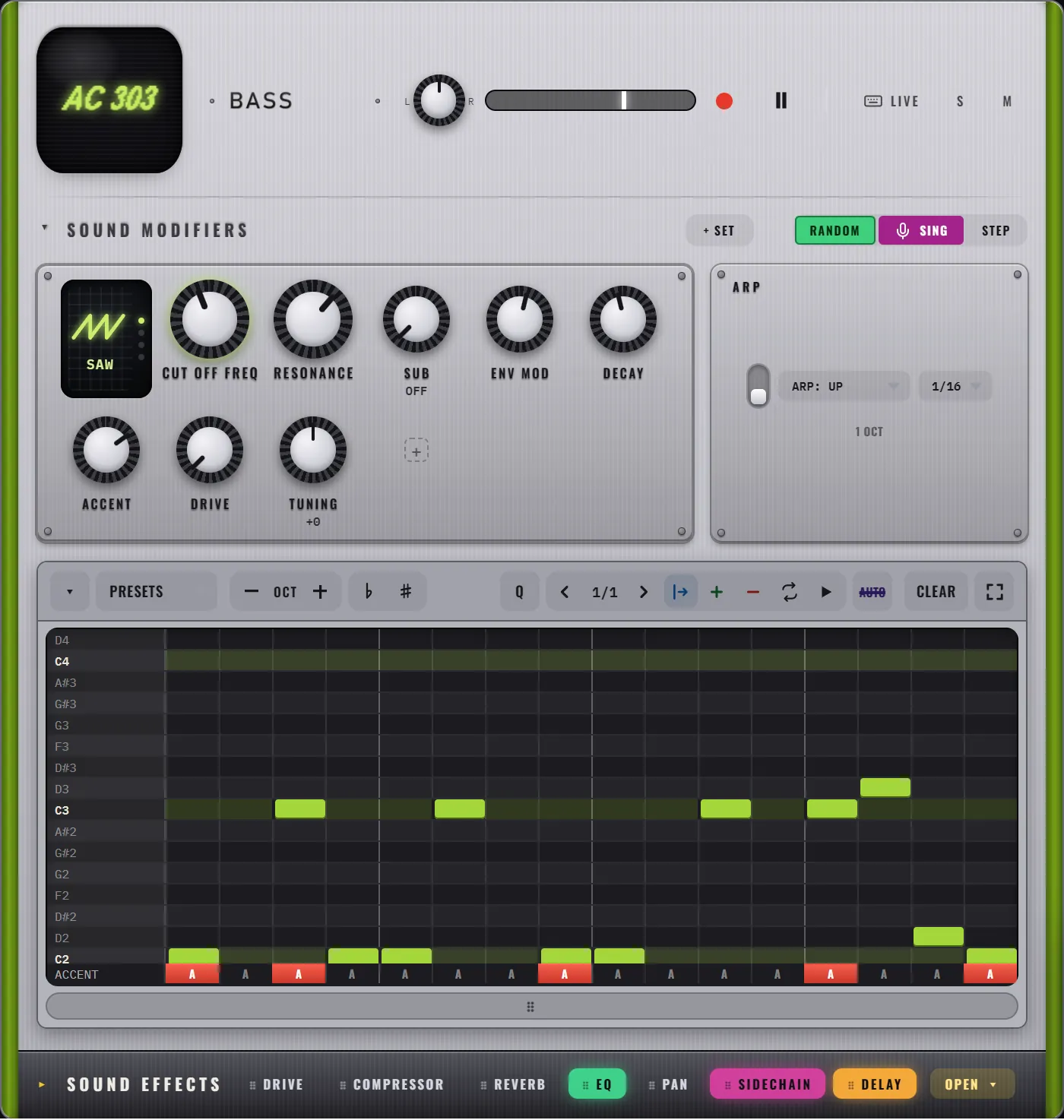
The TB-303 came out in 1981 as a bass machine for guitarists to practise with. It did not sell. A few years later, Chicago producers picked up cheap second-hand units, turned the resonance knob all the way up and found a sound nobody had heard before. Phuture's "Acid Tracks", released in 1987, is often called the first acid house record.
That sound is what this guide is about.
What makes a bassline sound acid?
Four ingredients, all on the AC 303 machine in EASY RAVE:
- Resonance. A peak at the filter's cutoff that makes the bass whistle and squelch. Turn RESONANCE well past halfway.
- Envelope sweep. Each note opens the filter and lets it fall closed again. ENV MOD sets how far it opens, DECAY how fast it falls.
- Accents. Accented notes hit harder and open the filter further. This is where the "wow" in "wow-wow" comes from.
- Slides. A slide glides from one note into the next instead of jumping. Slides between notes an octave apart are the classic acid squelch.
Then you move the CUT OFF FREQ knob by hand while the loop plays. A static acid line gets boring in 8 bars. A moving one can carry a whole track.
How do you make an acid house track?
- Set the tempo. Anything from about 120 to 130 BPM works. EASY RAVE starts at 122.
- Lay down a house beat. On HOUSE 909, pick House from PRESETS, or program a kick on every beat with claps on 2 and 4. Drum patterns for beginners has more.
- Start the bassline. On AC 303, pick Classic acid from PRESETS, or press RANDOM until a line grabs you. RANDOM writes a new acid line into the bar you are viewing, always in key.
- Dial in the squelch. RESONANCE past halfway, ENV MOD around halfway, DECAY short to medium, ACCENT up. Use the SAW wave for the classic buzz, or click the wave screen to try SQU (square) for a hollower tone.
- Add slides and accents. Under the notes there is an ACCENT lane: click A on a step to accent it. Just below it is the SLIDE lane: click S on a step to glide into the next note. If you cannot see the SLIDE lane, drag the handle under the roll to make it taller.
- Add grit. Turn DRIVE up. It distorts the bass without making it louder.
- Sweep the filter. Hold Z anywhere and turn the mouse wheel: the bass cutoff moves while you keep your eyes on the rest. To keep the move, open AUTO in the transport and press REC AUTOMATION while you sweep.
- Give it space. In the bass's SOUND EFFECTS, switch on DELAY at 1/8. (dotted eighth) and keep the amount low. A little echo makes the line sound bigger than it is.
What does a classic acid line look like?
This one uses only C, its octave and two other notes from C minor. The movement comes from accents and slides, not from a complicated melody:
A classic acid line in C minor
| 1 | 2 | 3 | 4 | 5 | 6 | 7 | 8 | 9 | 10 | 11 | 12 | 13 | 14 | 15 | 16 | |
|---|---|---|---|---|---|---|---|---|---|---|---|---|---|---|---|---|
| NOTE | C2 | C2 | C3 | C2 | C2 | C3 | C2 | C2 | C2 | C3 | C2 | C2 | ||||
| ACCENT | A | A | A | A | A | |||||||||||
| SLIDE | S | S | S |
Click the notes into the AC 303 piano roll (rows are notes, columns are the 16 steps), then set the A and S flags under them. For 6 more lines and how the RANDOM generator decides what to write, see acid bassline patterns.
What do the AC 303 knobs do?
| Knob | What it does to the acid sound |
|---|---|
| CUT OFF FREQ | How open and bright the bass is. The main knob to perform with |
| RESONANCE | The squelch: a whistling peak at the cutoff |
| ENV MOD | How far each note sweeps the filter open |
| DECAY | How fast the sweep falls back, so how long each note "wows" |
| ACCENT | How much harder the accented notes hit |
| DRIVE | Overdrive grit, without extra volume |
| SUB | A clean sub bass under every note, so the line still has weight on small speakers |
| TUNING | Moves the whole bass higher or lower |
Filter cutoff and resonance explains the filter in plain words, with things to try on each knob.
How do you keep an acid track interesting?
- Write a second bar. Press + on the AC 303 sequencer to copy the bar, then change 2 or 3 notes. The line now answers itself.
- Use the arpeggiator. Switch on ARP on AC 303, press LIVE, and hold 2 or 3 number keys: the bass plays them as a synced pattern. Try ARP: RANDOM at 1/16.
- Drop the beat. Click NO KICK in the LIVE FX bar and let the acid line play alone for 8 bars. When the kick comes back, it hits twice as hard.
- Change the key. ROOT and SCALE at the top of the screen move every machine at once. Phrygian gives acid a darker, tense edge.
Frequently asked questions
Do I need a TB-303 to make acid house?
No. The TB-303 defined the sound, but many synths can make an acid line if they have a resonant filter, accents and slides. EASY RAVE has AC 303, a free bass synth inspired by that sound, which runs in your browser.
What BPM is acid house?
Classic Chicago acid house sits around 120 to 125 BPM. Acid techno often runs faster, around 130 to 140. In EASY RAVE you set the tempo by dragging the TEMPO display, from 60 to 180 BPM.
Why does my acid line sound flat?
Usually the resonance is too low, the cutoff is not moving, or there are no accents and slides. Turn RESONANCE past halfway, accent 3 or 4 steps per bar, add 2 slides, and sweep CUT OFF FREQ while it plays.