Effects and mixing
Live effects: how to perform drops, stutters, loops and filter sweeps
Live effects turn a loop into a performance. In EASY RAVE's LIVE FX bar, DROP builds tension and lands a drop on the downbeat, NO KICK and ONLY KICK strip the drums, STUTTER and LOOP repeat the beat, LO PASS and HI PASS sweep filters over the whole mix, CRUSH degrades it, and the PHASER, ECHO and HEAVY knobs colour everything. Hold a pad to use it; right-click to keep it on.
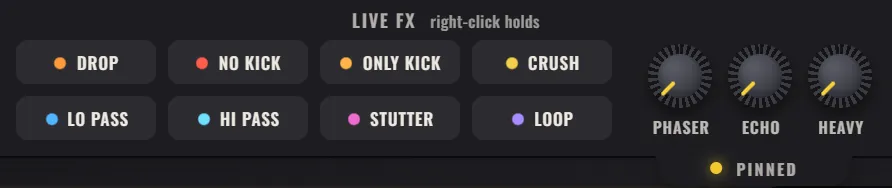
A loop that never changes gets boring in a minute. DJs and live electronic acts keep the same loop exciting for 5 minutes by changing how it sounds while it plays. That is what the LIVE FX bar at the top of EASY RAVE is for.
How do the live effects work?
The pads sit in the top bar under LIVE FX, next to the tempo. They work on the whole mix, not on a single machine, so one press changes everything you hear.
- Hold a pad (CRUSH, LO PASS, HI PASS, STUTTER, LOOP): the effect runs while you hold it and stops when you let go.
- Click a switch (DROP, NO KICK, ONLY KICK): it stays on until you click it again.
- Right-click any pad to keep it on without holding. It stays on until you right-click it again.
Most hold pads also have a key, so you can play them from the keyboard while your mouse turns a knob: S STUTTER, D LOOP, F CRUSH, G LO PASS and H HI PASS. You can change these keys in the shortcut map (press ?).
How do you build and land a drop?
DROP is a complete build-up in one switch. Built the way an EDM drop is built, it works like this:
- Click DROP while the track plays. A snare roll starts and grows, the kick drops out and the effects swell. If the song is stopped, DROP starts it.
- Let the tension ride for a few bars.
- Click DROP again. The build carries on to the next downbeat and lands exactly there, with an impact and a sub underneath it.
Because the drop always lands on a downbeat, you can click a little early and it still hits in time.
What do NO KICK and ONLY KICK do?
- NO KICK mutes every kick drum in the rack. The track keeps playing without its anchor, which is the oldest breakdown trick there is. Click again and the kick slams back.
- ONLY KICK does the opposite: it drops everything in the drum machines except the kick.
They are opposites, so switching one on switches the other off.
What do STUTTER and LOOP do?
- STUTTER repeats the current 16th note over and over, like a machine gun on the beat. While holding it, drag up for faster repeats.
- LOOP grabs the last beat and loops it. While holding, drag up or down for a shorter or longer loop, down to a single step.
Both are classic ways to build tension before a drop or to fill the last bar of a phrase. Let go on the first beat of the next bar and the track snaps back in place.
What do LO PASS and HI PASS do?
They sweep a filter over the whole mix:
- LO PASS removes the highs. The track sinks under water, as if it were playing in the next room.
- HI PASS removes the lows. The kick and bass drain away and the track thins out, which builds tension. Release it on a downbeat and the low end crashes back in.
Filter cutoff and resonance explains low-pass and high-pass filters in more depth.
What does CRUSH do?
CRUSH reduces the bit depth of the whole mix, like an old game console. Hold it and drag up for fewer bits and a harsher, grainier sound. A short burst of CRUSH on the last beat of a bar works as a fill.
What do the PHASER, ECHO and HEAVY knobs do?
| Knob | What it does |
|---|---|
| PHASER | A woozy, swirling phaser over the whole mix. Great in breakdowns |
| ECHO | A tempo-synced echo over the whole mix. Or hold B anywhere and turn the mouse wheel |
| HEAVY | Squashes the whole mix: louder, pumping and a little dirty. For the peak of the track |
How do you combine live effects into a performance?
A simple 32-bar routine to practise:
- Bars 1 to 8: the full loop.
- Bars 9 to 16: NO KICK on, PHASER up. Breakdown.
- Bars 13 to 16: click DROP, hold HI PASS for the last 2 bars.
- Bar 16: click DROP again so it lands on bar 17, release HI PASS, NO KICK off.
- Bars 17 to 24: everything back, HEAVY up.
- Bar 24: hold STUTTER on the last beat as a fill.
To keep the performance, click the red record circle and choose RECORD LIVE PERFORMANCE before you start. It records everything you play to a WAV or MP3 file. For bigger changes between parts, save versions of the track with + under SECTIONS and click them while you play. Save, export and share covers recording.
Frequently asked questions
What is a stutter effect in music?
A stutter effect rapidly repeats a short slice of audio, such as a 16th note, so it sounds like the music is skipping or rolling. It is often used to build tension before a drop or as a fill at the end of a phrase.
How do DJs make a drop?
DJs build tension with filters, rising effects and by removing the kick, then release everything on the first beat of a new phrase. In EASY RAVE, the DROP switch does the build automatically and lands it on the next downbeat.
Can I use live effects with a keyboard?
Yes. In EASY RAVE, S, D, F, G and H play STUTTER, LOOP, CRUSH, LO PASS and HI PASS while held, and holding B while turning the mouse wheel controls the echo. The keys can be changed in the shortcut map.